Vention has been a trusted platform for tens of thousands of manufacturers and system integrators to deploy factory automation worldwide. Vention’s Developer Toolkit (VDT) and Command Line Interface (CLI) have been integral to that deployment success.
This year at IMTS 2026, Vention is launching its successors. Here’s what the VDT and Vention CLI 2.0 offer, how to get started, and why it makes deploying automated systems on your factory floors easy.
What are the Vention Developer Toolkit and Vention CLI?
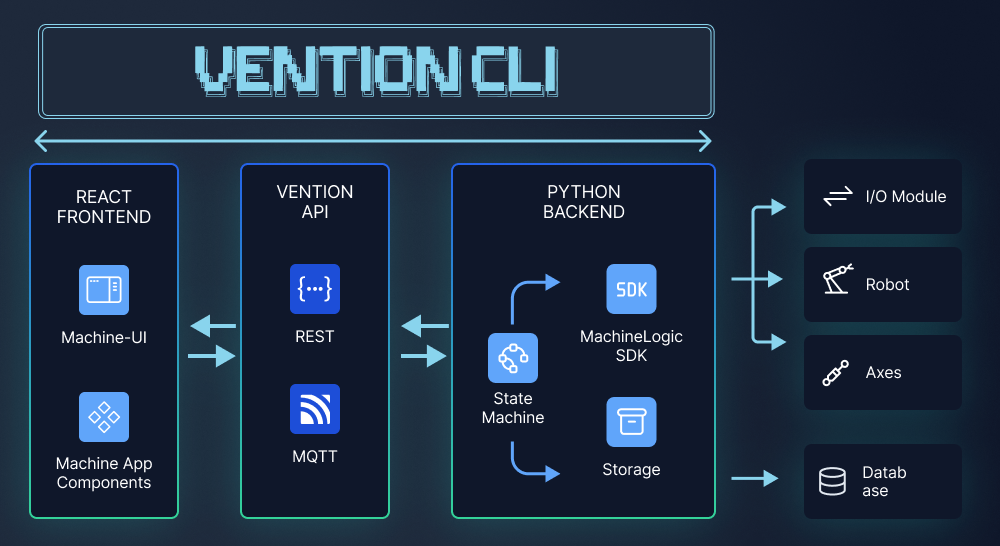
The VDT is a complete set of tools and components that enable Vention users to build custom automation applications. Crafted from years of experience and more than 28,000 factory implementations, it uses the same proven architecture the internal Vention team does. The VDT is used in-platform when an engineer writes code in MachineLogic, or outside the platform when using a local IDE.
The Vention CLI is the interface between the IDE and the Vention platform. It enables local development of MachineLogic Python applications with bidirectional syncing between your IDE and MachineBuilder.
Both the VDT and CLI are important elements of Vention’s MachineAgent, which brings Agentic AI to each phase of the automation project lifecycle. In short, the CLI and VDT allow users to work with their already-familiar coding agents like Claude Code. It’s ideal for complex applications, for those working with a preexisting development workflow, and for those looking for more detailed version control.
VDT: The Component Updates
With the VDT, developers are equipped with the necessary components to go from automation concept to working system. Each module comes pre-integrated with Vention’s cloud platform and digital twin, which gives developers a consistent, reliable means of simulation. It’s also the structure to program on edge, integrating seamlessly with MachineMotionAI. There are a few key component updates that make the VDT 2.0 even more powerful, including:
-
State Machine: Instructions can now run on entry and exit of start and stop states instead of mid-state logic.
-
Storage: Updates include schema migrations so a database can evolve to new fields and change shapes automatically when fixing bugs or adding features. Filters and pagination are also available for detailed queries as data grows.
-
Communication: Offers integrated OpenAPI support, enabling generated clients and typed API consumption. Your environment knows the exact shape of the data your API requires before running the code, helping catch errors early.
-
MachineUI: New components like icons and buttons have been added to the library.
-
MachineApp: Aggregation components like widgets and pages, page-level password protection, and internationalization support for program translation are now available.
Vention CLI Updates
Much of the CLI is still the same tool developers know and trust, but the biggest update is agent context. The CLI now gives the Vention AI agent or external agent context on configurations and scene assets, with a new logs command that retrieves execution data from the digital twin. This allows the agent to see what happened during simulation, diagnose issues, and revise the program as needed.
The new ‘vention logs’ command also makes iterating faster and more user-friendly. This is an important “iterate” step of the agentic programming loop.
Getting Started with Vention CLI and VDT 2.0
Working with CLI and VDT 2.0 is simple and follows the same steps as the original versions. Begin by building with the VDT directly within MachineLogic, or from your local development environment if it better suits your workflow.
-
Starting in MachineLogic: Vention’s cloud programming platform is based on the VDT and already has libraries pre-configured. The application template option applies examples of functional code to help you get started.
-
Using your own IDE: Install the Vention CLI to sync your local environment with the Vention cloud. This enables editing, versioning, and seamless push updates. You can also validate the entire workflow in a digital twin before deployment.
-
Refer to the documentation: Comprehensive documentation, setup instructions, and starter templates are always available in the VDT guide to make toolkit navigation easier. Explore the guide here.
AI Tooling Built for Your Future
The CLI and VDT are great starting points for building powerful automation systems that scale. But it’s the broader, end-to-end ecosystem powered by Vention’s intelligence that takes the project lifecycle from a single concept to a proven multi-production-line system.
Vention is unveiling CLI and VDT 2.0 at IMTS 2026. Follow the Vention LinkedIn page for the latest updates and other feature announcements.